

Bluehost AI Builder has a free plan and three paid plans:
| Plan | Monthly billing | 12-month billing | Credits | Your own domain |
|---|---|---|---|---|
| Free | $0, no card | $0 | 5 a day, up to 30 every 30 days | No |
| Lite | $20 a month | $16 a month ($192 upfront) | 100 a month | Yes |
| Standard | $40 a month | $32 a month ($384 upfront) | 200 a month | Yes |
| Pro | $80 a month | $64 a month ($768 upfront) | 400 a month | Yes |
Prices checked in the AI Builder upgrade screen and on bluehost.com/ai-builder, 18 November 2026. Pro appears in the upgrade screen but not on the public pricing table.

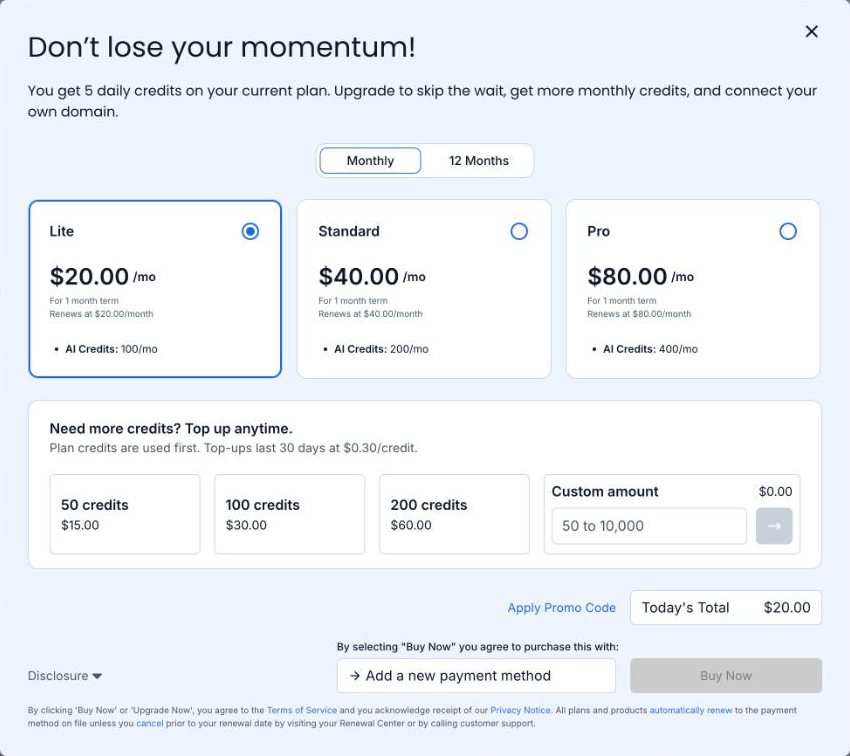
Every plan includes hosting, and the paid plans are identical apart from the number of credits. So the choice comes down to how many credits you’ll use. I built a website and a client portal for my Bluehost AI Builder review, and the numbers below come from that build.
What a credit buys
One message that creates or changes your site costs one credit, whatever its size. These are the credits my build used:
| What I asked for | Time it took | Credits |
|---|---|---|
| First build: five-page website, enquiry form, client login area and admin panel | About 5 minutes | 1 |
| A 14-day rule on the enquiry form, plus a new “How it works” page | About 1.5 minutes | 1 |
| Sitemap, canonical tags, Open Graph tags and schema markup | About 2 minutes | 1 |
| A question about robots.txt that didn’t change anything | Under a minute | 0 |
Publishing and hosting don’t use credits either. If you run out, your published site stays online and only new changes pause.
Two things cost a credit that you might not expect. Bluehost’s FAQ says a build that fails still uses one, and you should contact support if that happens. There’s also no undo button, so reversing a change means asking for it to be changed back, which is another credit.
A message that asks for five changes costs the same as a message that asks for one, so bundle them.
Is the free plan enough?
For building, yes. It costs nothing, needs no card and doesn’t expire. Five credits a day is enough for a first build and several rounds of changes, and my whole test used three.
What it can’t do is get your site found. The free plan publishes to a random address ending in .app.bluehost.ai, and Bluehost says that address isn’t indexed by search engines. I’ve covered what that means in Bluehost AI Builder SEO.
So the free plan suits three jobs: building and testing until the site is right, showing a draft to someone, and running a tool you only ever share by link, such as a quote form for existing customers.
The plans cost the same per credit
On monthly billing, every paid plan works out at 20 cents a credit. On 12-month billing it’s 16 cents. A bigger plan gives you more credits at the same price per credit.
Top-ups cost more. You can buy 50 credits for $15, 100 for $30 or 200 for $60, or any amount from 50 to 10,000, which is 30 cents a credit. Top-up credits last 30 days, and your plan credits are used first. The upgrade screen offered top-ups on my free account, so you don’t need a paid plan to buy them.
Lite plus top-ups stays cheaper than Standard until you need more than about 166 credits in a month. A month needing 150 credits costs $35 on Lite with a 50-credit top-up, against $40 on Standard.
Unused credits don’t roll over. Plan credits expire 30 days after they’re added, so a 12-month Lite plan gives you 100 credits a month, not 1,200 upfront.
Which plan I’d pick
Stay on Free while you build. There’s no reason to pay before the site is ready for customers.
Move to Lite when you want the site on your own domain. A hundred credits a month is plenty once a site is live, given that my entire build took three. I’d pay monthly for the first month and switch to 12 months once you know it works for you, which takes Lite from $240 a year to $192.
I can’t see many small businesses needing Standard or Pro after launch. They make sense if you’re changing things every day, or running several sites and apps on one account. Each account has one AI Builder plan, and it covers all your projects.
Other costs to know about
A domain isn’t included in the plan price. You can buy one through Bluehost or connect one you already own.
Form emails need an account with Resend or Postmark, because Bluehost doesn’t send them for you. Both have their own pricing.
Paid plans renew automatically. You can move up a plan at any time from inside the builder, but moving down means contacting support. If you cancel, your account drops back to the free plan at the end of the billing term. Your sites stay online on their free addresses and your custom domain is disconnected.
It’s $0 to start, no credit card. Try Bluehost AI Builder free.
FAQ
It’s $0 to start, no credit card. Paid plans are $20, $40 or $80 a month on monthly billing, or $16, $32 or $64 a month on a 12-month term. They differ only in monthly credits: 100, 200 or 400.
My first build, a five-page website with a client login area and an admin panel, took one credit. Each change after that took one. A message costs one credit regardless of length.
No. Plan credits expire 30 days after they’re added, and top-up credits expire 30 days after purchase.
Your published site stays online. New changes pause until your credits refresh, you buy a top-up, or you upgrade.
Disclosure: I’m a Bluehost affiliate. If you sign up through a Bluehost link on this page, I may earn a commission at no cost to you. Bluehost also paid me a flat fee for my separate review of AI Builder.