


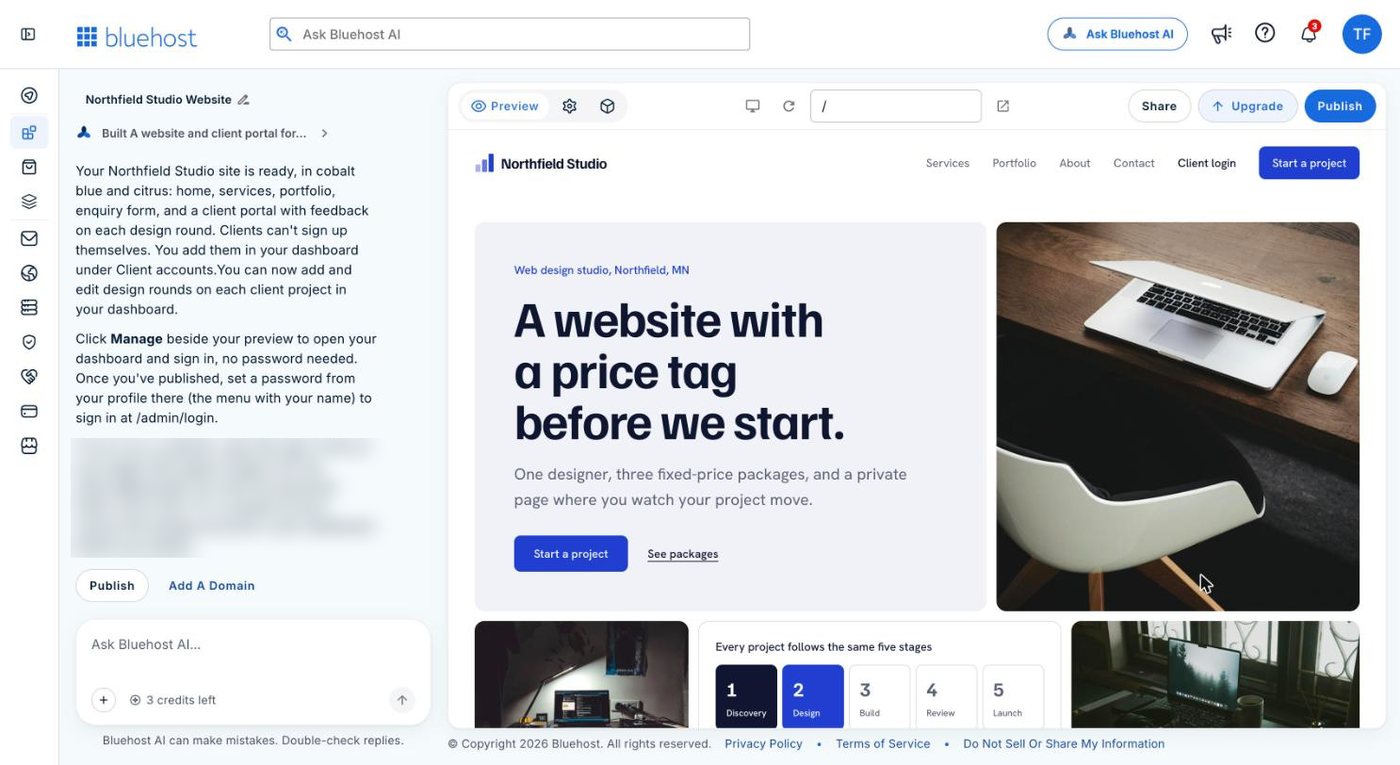
Bluehost now sells three AI builders with nearly the same name, plus a fourth for online shops:
- WordPress AI Builder builds a normal WordPress site on Bluehost’s WordPress hosting. Pick it if you want WordPress.
- Bluehost AI Builder builds a website and working web apps, such as booking forms and client portals, entirely by chat. Pick it if you want something working quickly and never want to touch WordPress.
- AI Website Builder is the earlier chat builder. If you already have a site on it, nothing changes for now.
- AI Store is for selling products online.
This site runs on WordPress. I also built a website and a client portal on the new AI Builder for my Bluehost AI Builder review, so I’ve used both sides of this.
WordPress AI Builder: a WordPress site with a head start
This used to be called WonderSuite. Bluehost announced the new name, WordPress AI Builder, on 30 September 2026.
It comes with Bluehost’s WordPress hosting plans. You answer some questions about your site, it offers you three designs with colours, fonts and starter content, and the one you pick is saved into WordPress. From then on it’s an ordinary WordPress site. You edit it in the WordPress dashboard and install whatever plugins you like.
Because it’s WordPress, the site is yours to move. If the host raises its prices or the service gets worse, you take the site somewhere else.
If you already know WordPress, you don’t need the AI part at all. Any decent host will do, and I’ve written up how to build a WordPress site from scratch.
Bluehost AI Builder: a website plus a working app, by chat
This is the newest of the three, and Bluehost’s site still labels it Early Access.
You describe what you want in a sentence or two, it builds it, and you change it by chatting. There’s no editor and no dashboard full of settings. What’s new is that it builds web apps as well as pages: booking systems, quote request forms, customer portals with logins, and an admin panel where you manage what comes in.
I asked it for a web designer’s website with a client login area and an admin panel. One message built all of it, in about five minutes.
It isn’t WordPress. There are no plugins to keep updated, but there’s also no way to take your site with you. Bluehost’s FAQ says AI Builder has no source code access, no FTP and no export. If you leave, you start again somewhere else.
AI Builder is quicker to start and harder to leave.
It’s free to start, with no credit card. The free plan gives you 5 credits a day, up to 30 every 30 days, and one message costs one credit. Paid plans start at $20 a month and add your own domain. Sites on the free plan aren’t indexed by search engines, which I’ve covered in Bluehost AI Builder SEO.
AI Website Builder: the earlier version
Bluehost launched AI Website Builder earlier in 2026. According to Bluehost’s help centre, it builds a hosted WordPress site from a conversation, with a 14-day free trial and a paid plan to publish. You can edit the site in the WordPress dashboard, but you can’t install or remove plugins or change the theme.
Bluehost describes the new AI Builder as the next step on from it. Its FAQ says existing AI Website Builder customers see no change, and their sites aren’t being moved to AI Builder at this time.
When I checked on 17 November 2026, Bluehost’s AI Website Builder page showed the same “free to start, no card” pitch and a demo labelled Bluehost AI Builder. It looks as though new customers are being steered to the new product, but Bluehost hasn’t said so, and its help centre still documents the older one.
AI Store: for selling things
AI Builder doesn’t handle selling or payments. Bluehost’s FAQ says so directly and sends you to AI Store if you want an online shop.
Which one I’d choose
If you want a blog, a content site, or anything you expect to grow for years and rank in Google, choose WordPress. Use WordPress AI Builder if you’re hosting with Bluehost anyway and want the head start.
If you run a small business and want a decent site with a booking form, a quote form or a client login, and you don’t want to learn anything new, choose AI Builder. Start on the free plan and only pay when it’s ready to go live on your own domain. Try Bluehost AI Builder free.
If you want to sell products, choose AI Store.
FAQ
No. AI Builder is Bluehost’s own platform, edited by chat, with no WordPress dashboard and no code export. Bluehost’s WordPress option is WordPress AI Builder, which comes with its WordPress hosting.
Bluehost renamed it WordPress AI Builder in September 2026. It’s the same guided way of starting a WordPress site.
No. AI Website Builder is the earlier product, which Bluehost’s help centre describes as building a hosted WordPress site. AI Builder is the newer chat builder, which also makes web apps and has a free plan.
Not directly. There’s no code export, so you’d rebuild the site in WordPress. Bluehost says you can ask AI Builder to add a CSV export button for your data, such as form submissions.
Disclosure: I’m a Bluehost affiliate. If you sign up through a Bluehost link on this page, I may earn a commission at no cost to you. Bluehost also paid me a flat fee for my separate review of AI Builder.
Product details checked on bluehost.com, its blog and its help centre, 17 and 18 November 2026.